Build
Why I Built Solid Flow: CAD on a Tablet, with AI as a Co-pilot, Not the Pilot
A father of two, a tablet, spare minutes, and an AI that helps you model instead of modelling for you.
I used to spend whole weekends designing parts for my 3D printer. A bracket that fits exactly, a case for an ESP32 project, a replacement knob nobody sells anymore. Then life happened, the good kind. I’m a father of two now, and I work a day job. Sitting at a desktop for three uninterrupted hours with SolidWorks open is no longer something my week has room for.
What my week does have are small pockets of time. Twenty minutes after the kids fall asleep. A lunch break. Waiting in the car. In those moments, the device within reach isn’t a workstation. It’s my tablet.
So I asked a simple question: why can’t I do real CAD on it?
That question became Solid Flow.
The tools I tried first
I didn’t start by building. I started by looking, because nobody wants to write a CAD app if a good one already exists.
Shapr3D was the first that inspired me. It proved that serious 3D modelling with a pen on a tablet is not only possible but genuinely enjoyable. The catch, for me, was the hardware. It shines on an iPad Pro with an Apple Pencil, and that combination is expensive, especially when I already own an Android tablet with an S Pen sitting right in the box.
Onshape looked like the perfect candidate next. It’s real parametric CAD, it runs in the browser, and it works on tablets. But on the free plan your documents are public, so keeping my designs private means paying. And even then, everything lives in their cloud. There’s no local copy on my own device. I understand the reasons, but it made me uncomfortable. My half-finished ideas should be mine first, on my tablet, and synced somewhere only if I say so.
Then there was a third group: the new AI 3D generators. Type a sentence, get a model. Impressive demos. But look at what they actually produce: a mesh, usually an STL. A frozen shape. You can’t change the wall thickness. You can’t move a hole 2 mm to the left. You can’t open the history and see how it was made, because there is no history. You’re a spectator, not a designer. If the result is 90% right, you start over and hope the next roll of the dice is better.
None of that felt like making something.
What I wanted instead
I wrote down what my ideal tool would be, and it came down to three things.
1. Real CAD, the kind I learned on. Sketch a profile, dimension it, turn it into features, and be able to change any of it later. If you’ve used SolidWorks, you know the rhythm: a FeatureManager tree, Smart Dimension, Extruded Boss/Base. I didn’t want to reinvent that. I wanted to bring it to a tablet.
2. The S Pen as a first-class tool. Sketching with a pen is natural in a way a mouse never was for me. Drawing a line, tapping two edges to dimension them, scribbling on a face to say “here”, all with the pen, while fingers rotate and zoom the view.
3. AI that helps, but never takes the wheel. This is the one I care about most.
AI as a co-pilot, not the pilot
In Solid Flow, the AI is called Draft AI. You hold the mic and describe what you want, or type it. Something like: “Create a 3D model of an Arduino Uno for reference.”
Draft AI doesn’t spit out a mesh. It first shows you a plan: the features it intends to build, with real dimensions. You can tap Build, or say what to change.
Then it builds the part the same way you would: a fully defined sketch, a dimension, an extrude, one feature at a time. Every feature lands in the tree with a name you can read.
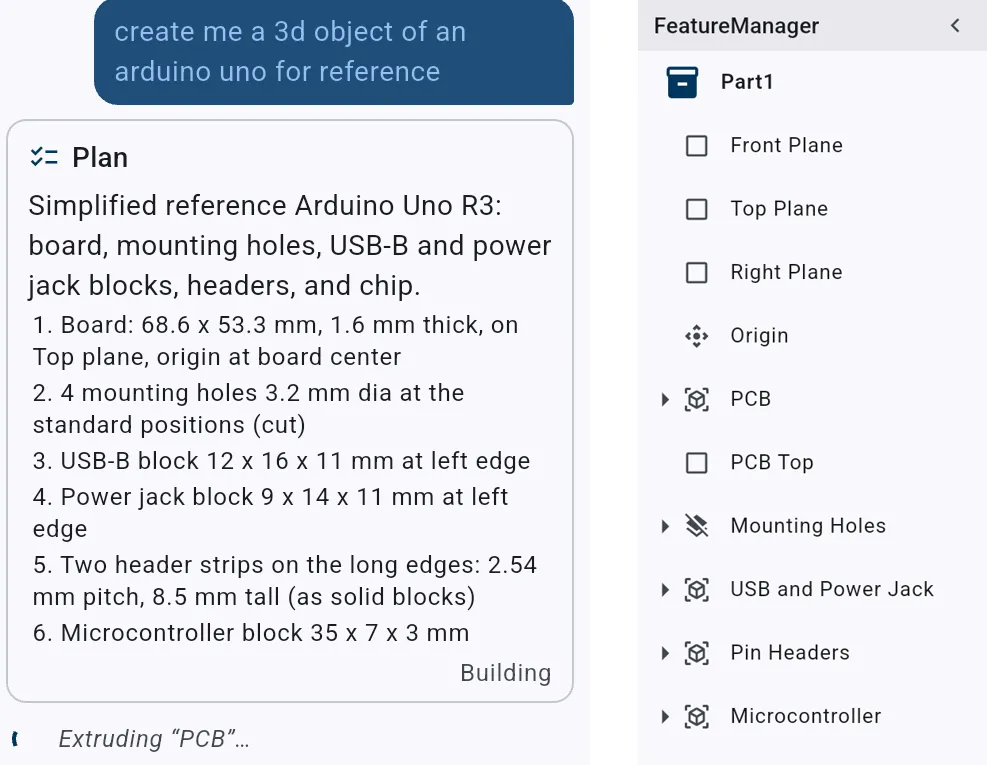
And what you get at the end isn’t a frozen shape. It’s ordinary, editable features. If the board is 1 mm too wide for my case, I open the sketch and change the number. If I don’t like what Draft AI did in a turn, it’s a single Undo.
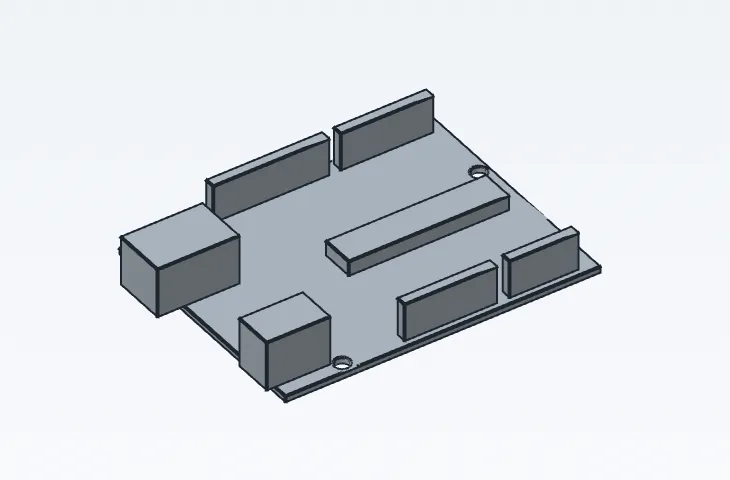
I also built guardrails in, because good CAD has good habits. Draft AI isn’t allowed to build from an under-defined sketch. If a feature fails, it’s removed instead of left broken. And it asks before touching anything I made myself. The goal is that the model Draft AI leaves behind is one I’d be happy to have made by hand, because I’ll be the one editing it next.
Learning by doing, with AI beside you
The way I think about it is like being a student again, with a patient senior engineer sitting next to you.
The fundamentals are still yours: sketches, constraints, design intent, the order of features. You see every step being made, in the same tree and with the same tools you’d use yourself. When Draft AI builds something, you can open it up and learn how it was built. When you build something yourself, Draft AI can pick up where you left off.
That’s very different from a black box that hands you an STL. One teaches you CAD. The other teaches you to type prompts. I wanted the first one, for myself, and for students, makers and hobbyists who want to actually understand what they’re making. AI just makes the journey faster and a lot more fun.
What Solid Flow can do today
It started as a weekend project and grew into a real tool. Today Solid Flow has:
- Sketching with lines, rectangles, circles and arcs, plus Smart Dimension and relations. It tells you when a sketch is fully defined.
- Features: extrude, revolve, sweep, loft and boundary (as boss or cut), fillet, chamfer, shell, linear and circular patterns, mirror and reference planes.
- A FeatureManager tree where you can edit, roll back and rename any step.
- Measuring on the solid: Smart Dimension works on the 3D model too, with reference dimensions and a Measure panel.
- Mock-up ink: draw on the model in colour with the S Pen, and Draft AI reads your marks along with your words.
- Assemblies and STL export for 3D printing, and copying files to Downloads, Drive or USB.
- Local-first saving: parts save to your device first, then back up to your own account automatically. That’s the thing Onshape couldn’t give me.

From my tablet to everywhere
It began on my Galaxy Tab with the S Pen, and that’s still where it feels most at home. But the same app now also runs:
- In the browser at solidflow.sibool.com, on any computer.
- On Windows, with mouse, keyboard and touchpad shortcuts. Downloads for x64 and Windows on Arm (Snapdragon) PCs are coming soon.
Your parts follow you between them. Start a bracket on the tablet at lunch, finish it on the PC at night.
Accounts are approved by hand for now, the same way I run my training simulator A-Sim. It keeps things small and personal while I learn what people actually need.
Under the hood, briefly
For the curious: Solid Flow is written in Flutter and Dart, including its own solid-modelling engine. One code base for Android, Windows and the web. Draft AI runs on Anthropic’s Claude through a Firebase Cloud Function, so no keys live inside the app. If you’re interested in how I think about putting AI to practical use, I wrote about a related approach in What is RAG and why should you consider it over training your own model?
Try it
Solid Flow is free to try, with a daily Draft AI allowance. You can open it in your browser right now, or join the beta on Google Play from the Solid Flow page. The public launch on Google Play is January 2, 2027.
One thing to know before you sign up: I review every new account myself. Create your account in the app, verify your email, and your request comes to me. Once I approve it, you’ll get an email and you can start modelling. It may take a little while, since I go through them by hand, usually after the kids are asleep.
I built Solid Flow so I could keep making things in the small pieces of time I have. If you’re a maker, a student, or a parent squeezing a hobby into the gaps like me, I hope it gives you some of that back too.
And if you try it, tell me what you’d make with it. That’s the best feedback a builder can get.
SolidWorks is a registered trademark of Dassault Systèmes. Solid Flow is an independent app, not affiliated with or endorsed by Dassault Systèmes, Shapr3D or PTC Onshape.